


Introduction
Nobody budgets for the time a modeler spends renaming views, filling the same parameter on two hundred elements, or setting up sheets one at a time. Each task takes a few minutes. None of them shows up as a line item. Over a project, they add up to a real share of the modeling hours you are paying for.
Automation is the obvious answer, and most BIM managers already know it. The harder question is where to start. Teams that automate the wrong thing end up with a folder of scripts nobody trusts, written by one person who has since moved on.
This blog covers how to find the repetitive work in your Revit process, which tasks are worth automating first, and what it takes to keep those tools working after Revit changes underneath them.
Executive Summary / Key Takeaways
- The cost of repetitive Revit work is hidden because each task is small. You have to measure it to see it.
- Start with tasks that are frequent, rule-based and low risk if the script gets it wrong. Read-only checks come before anything that writes to the model.
- Standardize before you automate. A script cannot work around inconsistent naming, parameters or view templates.
- Scripts are maintained assets. Revit 2027 moved to .NET 10, and add-ins have to be rebuilt and tested against it.
- Every tool needs an owner, a test model and documentation, or it stops being used the first time it breaks.
Industry Overview
Revit gives teams several routes to automation, and they suit different people. Dynamo is visual programming built into the Revit workflow. Dynamo Player, found under the Manage tab, lets someone run a graph through a simple dialog without knowing Dynamo, which means one person can build a tool and the whole team can use it. pyRevit is an open-source scripting framework that puts custom tools on the Revit ribbon. Custom add-ins built on the Revit API cover anything heavier.
The platform keeps moving. Revit 2027 runs on .NET 10, and Autodesk’s developer guidance says all add-ins must be built against the .NET 10 SDK, with some APIs deprecated or removed. The pyRevit 6.5.0 release notes list Revit 2027 compatibility updates. The practical message is that automation is not a build-once exercise.
Autodesk’s 2026 State of Design & Make: AI Pulse report, which surveyed 2,500 leaders across design and make industries, found that 98 percent are using at least one AI tool and 84 percent say AI has already improved productivity. The sample is not AEC-only. What matters more for a BIM team is the list of prerequisites the report points to: data readiness, workflow integration and process standardization. That is the same groundwork rule-based Revit automation needs.
Problem Statement
The work that drains modeling hours is rarely the work anyone would call difficult. It is the repeated setup, the copy-paste data entry, the manual export, the cleanup pass before issue. Because it is spread across many people and many small sessions, it never gets a line in the project budget and never gets counted.
We have not found a reliable published benchmark for how many hours this costs a typical BIM team, so we will not quote one. You can calculate your own: tasks per project, multiplied by minutes per task, multiplied by the number of people doing it, multiplied by your blended rate. Run it once for your own team before deciding anything else.
Challenges
Tasks too small to notice
A ten-minute task done fifty times is more than eight hours. Because no single instance feels worth fixing, nobody does.
Scripts depend on consistent names, shared parameters and view templates. If every project names sheets differently, the automation has to account for every variation, and it usually does not survive the next project.
Tools that live with one person
A script on one modeler’s laptop is a single point of failure. When that person changes projects or leaves, the tool goes with them.
A new Revit release can change the API and the runtime underneath a script. If nobody re-tests after an upgrade, the first sign of a problem is a wrong result in a live model.
Automating judgment
Some work needs a person to decide. Tag placement, view composition and anything that depends on design intent can be assisted but should not be fully automated. Starting there is how teams lose trust in automation.
Solutions: Inventory, Score, Automate, Maintain
Treat automation as a short program, not a side project. Log the repeated work, score it, fix the inputs, build the safest high-value tools first, and give each one an owner. The rest of the process is discipline, not code.
Step-by-Step Process: Deciding What to Automate
- Log repeated tasks for one or two weeks: what the task is, how often it happens, how long it takes and who does it.
- Score each task on frequency, time per run and cost of an error, and mark whether it follows clear rules.
- Standardize the inputs first: sheet and view naming, shared parameters, view templates and export settings.
- Pick the first targets. Prefer read-only checks, then tasks that write to the model with a preview step.
- Choose the lightest tool that works: a built-in Revit feature, Dynamo Player for team-run graphs, pyRevit for ribbon tools, or a custom add-in when the job needs one.
- Build against a test model, and add a report or dry-run step before any script changes data.
- Document it, store it in one shared and versioned location, and name an owner.
- Re-test every tool when the team moves to a new Revit release.
Benefits
- Modeling hours move from setup and cleanup to design coordination and QC.
- Fewer manual errors in repeated data entry and exports.
- More consistent output across projects, because the same tool does the same job every time.
- Easier onboarding, since the standard is built into the tools.
Features / Key Highlights: Where eLogicTech Fits
eLogicTech works as the production team behind U.S. architecture, engineering and construction firms, so we build automation the way modelers actually use it, inside live production, not as a separate exercise. BIM automation is one of our service lines, alongside Revit modeling for architecture, structure and MEP.
- Dynamo and pyRevit scripts for repeated Revit tasks
- Custom toolbars for AEC firms and for manufacturers
- Revit family creation and BIM model auditing
- Documentation and handover, so your team can run and maintain what we build
Anything we produce for a client belongs to the client. We keep scripts simple enough to be maintained by your own team, and we test them against the Revit release you work in.
Best Practices
- Start with reports. A script that only reads the model cannot break it.
- Keep each tool small and single-purpose. A tool that does one job is easier to test and trust.
- Put every script in one controlled location with version notes, not on individual machines.
- Make Dynamo Player the way the team runs shared graphs, so the person who built the tool is not the only one who can use it.
- Use a test model that includes the awkward cases, not only clean ones.
- Schedule a re-test after each Revit release, before the team depends on the tools.
Common Mistakes to Avoid
- Automating before standardizing the naming and parameters the script depends on.
- Beginning with a tool that edits the model, with no preview or backup.
- Building one large script that tries to do everything.
- Leaving ownership unassigned.
- Assuming scripts will keep working after a Revit upgrade.
- Automating tasks that need design judgment.
Comparison Table: What to Automate First
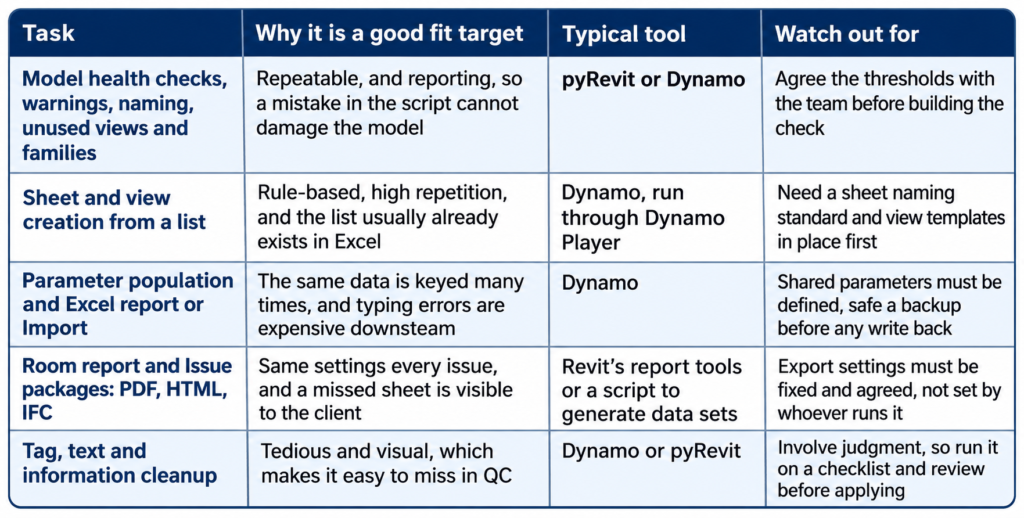
The order is deliberate: tasks that only read the model first, then tasks that write to it with a review step, then tasks that involve judgment.
Statistics & Industry Data
- Revit 2027 runs on .NET 10, and all add-ins must be built against the .NET 10 SDK. Some APIs are deprecated or removed, and the all-user add-in location moved from ProgramData to Program Files (Autodesk Developer Blog, April 10, 2026).
- pyRevit v6.5.0 release notes list Revit 2027 compatibility updates (pyRevit on GitHub).
- Dynamo Player is accessed from the Manage tab, under Visual Programming, and lets users run graphs built by others without Dynamo expertise (Autodesk Revit Help).
- Autodesk 2026 State of Design & Make: AI Pulse, 2,500 leaders across design and make industries: 98 percent use at least one AI tool, 84 percent report productivity gains, and 59 percent use or plan to use agentic AI within a year (reported by IMAGINiT, September 2026). The sample is not AEC-only.
- Typical Dynamo uses for Revit include creating sheets from an Excel list and exporting element parameters to Excel (BIMcommunity).
Case Study
Consider an AEC firm in Texas preparing a construction document set for a multi-story building. Sheet setup, view placement, parameter entry and issue exports were all done by hand, one modeler at a time, and nobody had counted the hours.
A two-week log showed the same handful of tasks coming up on every project. Before automating anything, the team fixed the inputs: one sheet naming convention, one set of shared parameters and a standard set of view templates. Then they automated in order of risk. First came a read-only model check that reported warnings and naming errors. Next was sheet creation from a spreadsheet list. Last was parameter transfer, with a report produced before any change was written.
Each script had a named owner and a test model. When the firm moved to a newer Revit release, the tools were re-tested before anyone relied on them, and some needed fixes. Modelers spent less time on setup, and QC comments shifted from naming mismatches to actual coordination issues.
Expert Insights / Tips
- Ask one question about every repeated task: if this script gets it wrong, can we see it before it matters? If the answer is no, it is not a first target.
- The first automation win is usually the standard, not the script. Agreeing the naming and parameters removes a good share of the manual work before any script exists.
- Measure before you build, and again afterwards. Without the first number, you cannot show the value of the second.
- Keep a short list of tools, who owns them and which Revit versions they were last tested on.
Future Trends
AI is making scripts quicker to write, and agentic tools are on many roadmaps. The Autodesk report found 59 percent of organizations already use or plan to use agentic AI within a year. Faster scripting does not remove the groundwork, though. A tool that acts on a model with inconsistent naming and parameters will act on bad data faster. The teams that benefit most will be the ones that standardized first. Revit’s move to .NET 10 is also a reminder that maintenance is part of the cost of any automation.
FAQs
Q: Should we use Dynamo, pyRevit or a custom add-in?
Use the lightest tool that does the job. Dynamo suits visual, project-level tasks and runs through Dynamo Player for non-programmers. pyRevit suits ribbon tools for the whole team. A custom add-in makes sense when a task is heavy, frequently used or needs a polished interface.
Q: Do we need a programmer on staff?
Not to run the tools. Dynamo Player lets users run graphs someone else built. You need someone who can build and maintain them, in-house or from a production partner.
Q: Will our scripts break when we upgrade Revit?
They can. Revit 2027 moved to .NET 10, and add-ins have to be rebuilt against it. Dynamo graphs and pyRevit tools should be re-tested on every release before anyone depends on them.
Q: What should we automate first?
Frequent, rule-based tasks that are low risk if wrong. Model health checks, sheet creation and data export are common starting points.
Q: Is Revit automation the same as AI?
No. Most Revit automation is rule-based and predictable. AI tools can help write or extend it, but both depend on well-organized models.
Conclusion
The hours lost to repetitive Revit work are not dramatic, which is why they survive. The fix is not a big automation program. It is counting the work, standardizing the inputs, starting with tools that cannot damage the model, and treating each script as something that needs an owner and a re-test. Done in that order, automation pays back quickly, and it keeps working.
Call-to-Action
Want to find your first three Revit tasks to automate? Talk to our team about BIM automation built around how your models are actually produced. https://www.elogictech.com/services