


Introduction
A Scan-to-BIM scope usually arrives with a line that says something like “model to LOD 300” or “LOD 350 as-built.” It rarely says how close that model has to be to the building that was scanned.
That gap is where renovation problems start. A model can be rich in detail, correctly classified, and cleanly built, and still sit several centimeters away from the real structure. The ductwork looks right. The new riser still doesn’t fit.
LOD and LOA answer two different questions. LOD asks how much detail and information the model elements carry. LOA asks how closely those elements match measured reality. Specifying one and skipping the other is one of the most common and least visible risks in existing-conditions work.
Executive Summary / Key Takeaways
- LOA is the USIBD framework for defining existing-conditions accuracy: five levels, LOA10 to LOA50, each stated at a 95 percent confidence level.
- LOA and LOD are separate specifications. A model can be high on LOD and still be wrong on the site.
- LOA separates measured accuracy (the captured data) from represented accuracy (the model). A model cannot be more accurate than the data beneath it.
- LOA applies to elements, not whole projects. Tier it: tight where the design collides with existing conditions, relaxed where the model is for reference.
- Most accuracy disputes come from two gaps: no defined level, and no agreed way to verify it.
Industry Overview: What LOA Actually Is
The Level of Accuracy specification comes from the U.S. Institute of Building Documentation (USIBD), which describes it as its most downloaded document. Version 3.0 was published on August 20, 2019, and the current specification guide is v3.1, which simplifies how tolerances are computed. The five levels were inspired by the tolerance classes in the German DIN 18710 standard.
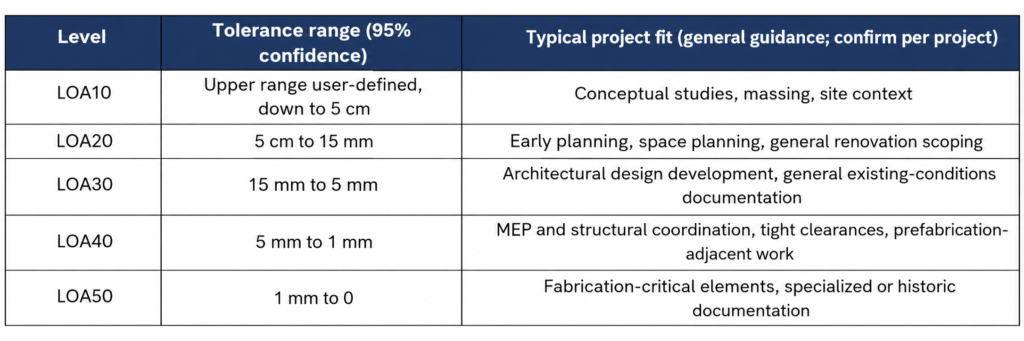
Two details in how the framework works matter more than the table itself.
The 95 percent confidence level is part of the spec. A stated tolerance means 95 percent of measured points fall within it, not every point. A scope that says “within 10 mm” without a confidence level is not a complete LOA statement.
LOA applies to elements, not whole projects. Each level can be applied to individual building elements within the same project. A structural frame, an MEP riser, and an interior finish do not need the same accuracy.
The framework also does not tell anyone how to capture data. It defines the outcome that has to be achieved, and leaves the method to the project.
LOA vs LOD: Why One Doesn't Cover the Other
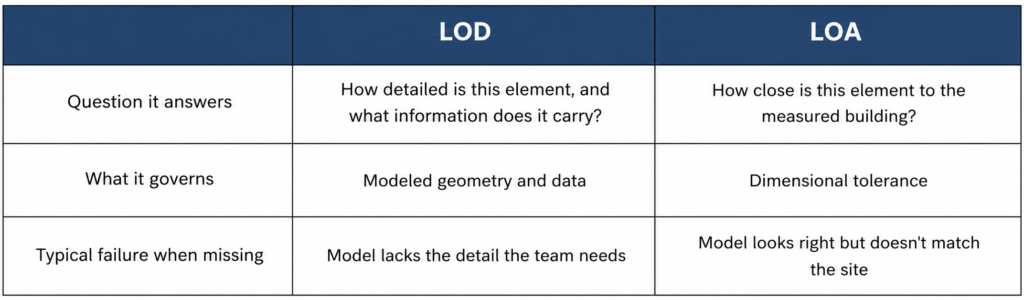
The dangerous combination is high LOD with low or unspecified LOA. The model looks fabrication-ready, so the team treats it that way. Nothing in the file warns them that the underlying accuracy was never defined. Ideally both are specified against the same element categories, so nobody has to translate between two tables.
Problem Statement
Point clouds look authoritative. They are dense and easy to rotate on a screen, and that appearance earns more trust than the data may have earned. When accuracy has not been defined or validated, registration shifts and accumulated drift can hide inside a dataset that looks seamless.
The problem surfaces weeks later, when dimensions don’t reconcile across a long floor plate or an element that looked aligned in the model sits somewhere else on site. At that point the question is contractual: was the data wrong, was the model wrong, or was the expectation never written down?
Challenges: Where Unspecified Accuracy Costs Money
Tight retrofit zones
New MEP routing through existing ceilings, shafts, and structure leaves very little margin. Centimeter-level drift in the model removes it.
Prefabrication
Any off-site fabricated component that has to land against existing structure is only as good as the as-built dimensions behind it.
Contract disputes
When a model’s accuracy was never specified, nobody can say whether a mismatch is a modeling error, a scanning error, or a scope gap. The argument starts from zero.
Validation that doesn’t match the target
Checking a room by measuring wall to wall stacks the deviation of two separate surfaces, each of which may be inside tolerance on its own. Good data can look bad, and rework follows. The validation method has to suit the level being claimed.
Precision mistaken for accuracy
Scanners produce highly repeatable measurements. Repeatable is not the same as correct. A dataset can be consistently offset by weak control, registration error, or drift along a long run of scans and still look clean.
Solutions: Specify LOA by Element, Not by Project
The instinct on many projects is to pick one accuracy level for the whole building, and the safe-sounding choice is “high.” That is expensive and usually unnecessary. Higher LOA means tighter scanning control, more registration discipline, and more modeling verification time.
A more defensible approach is to tier it. Tighten accuracy where the design will actually collide with existing conditions: structure, shafts, risers, slab edges, and anything receiving new fabricated work. Relax it where the model is for reference or space planning. This puts the accuracy budget where the risk is and keeps the scope price honest.
Step-by-Step Process: What a Scan-to-BIM Scope Should State
- LOA level per element category, not a single project-wide number
- The confidence level the tolerance is stated at
- The reference frame, absolute or relative, the accuracy is measured against
- A statement of intent: what the accuracy is for, so everyone reads the number the same way
- How accuracy will be verified before the model is accepted
- Whether the specified accuracy refers to the captured data, the final model, or both
On that last point, the USIBD framework distinguishes between how accurately something is measured and how accurately it is represented in the model. Modeling translates accuracy. It does not improve it. A scope that blurs the two leaves room for both sides to be right and still disagree.
Representation also involves judgment. Real walls are rarely perfectly flat or parallel. Where measured conditions are slightly irregular, a best-fit orthogonal representation can be valid, as long as the modeled condition stays within the stated tolerance of the measured data. Model what matters correctly, and record what was simplified.
Benefits
- One shared definition of “accurate” across architecture, MEP, structure, and construction.
- Accuracy spend aimed at the elements that carry risk.
- Fewer coordination surprises when trades check the model against real conditions.
- A defensible record if a dimension is questioned later.
Features / Key Highlights: Where eLogicTech Fits
eLogicTech’s Scan-to-BIM team builds as-built models from point cloud data for U.S. architecture, engineering, and construction firms, working as an extension of in-house BIM teams. When a project specifies LOA, we model to it. When it doesn’t, we raise the question during scoping, because an unstated accuracy requirement is a risk for the client and for us.
- Point cloud to BIM across architecture, structure, and MEP, with Revit modeling up to LOD 400
- Model-to-point-cloud checks within a structured 3-stage QA/QC review before delivery
- BIM model auditing against current scan data
- Element-level agreement on modeling tolerance and abstraction before production starts
For firms that need existing-conditions models they can design and coordinate against without second-guessing the dimensions, defining LOA up front is the cheapest quality control step available.
Best Practices
- Put LOA in the contract documents and the BIM execution plan, not in a side email.
- Use the same element categories for LOA and LOD.
- Match the validation method to the level being claimed, and agree it before the scan is delivered.
- Ask the capture provider to document control and registration, and the modeling team to document its abstraction rules.
- Revisit the LOA when scope shifts toward prefabrication or fabrication.
Common Mistakes to Avoid
- Writing “survey-grade” or “high accuracy” into a scope with no defined LOA behind it.
- Stating a tolerance without a confidence level.
- Assuming the model improves on the data it was built from.
- Reusing data captured for one purpose, such as visualization, for another, such as coordination, without re-checking the level.
- Treating LOA and LOD as one specification.
Statistics & Industry Data
- USIBD published LOA Specification v3.0 on August 20, 2019, adding a statement of intent, a defined upper range for LOA10, a user-defined LOA option, and a redesigned reference frame specification (USIBD, via LiDAR News).
- Five levels, LOA10 to LOA50, with tolerances specified at the 95 percent confidence level (USIBD LOA Specification).
- The current guide, v3.1, keeps the measured versus represented accuracy distinction and simplifies tolerance computation (LIDAR Magazine, 2025).
- The LOA defines the outcome that must be achieved and does not prescribe how data is captured (LIDAR Magazine, June 2026).
Case Study
Consider an AEC firm in Georgia taking an existing office floor through a full interior renovation. The scan data came from an outside provider, the scope said “accurate as-built model,” and no LOA was written. The architectural model was built to a level of development that worked fine for partitions and finishes.
Months later the MEP team routed new ductwork through a tight corridor ceiling and found that several clearances did not hold on site. The corridor data had never been specified to the tighter level that coordination needed, and nobody had agreed how it would be checked. The arguments that followed were about responsibility, not ductwork. A one-page LOA statement, tighter on the corridor and mechanical areas and looser on general partitions, would have settled it before the first model element was placed.
Expert Insights / Tips
- Ask one question at kickoff: what decision will someone make from this model that they cannot easily undo? Set the tightest LOA around that decision.
- When a provider quotes an accuracy figure, ask what it was validated against, and how.
- A high-LOD model with no LOA reads as more reliable than it is. Treat it with extra suspicion, not less.
Future Trends
Capture and processing keep getting faster, and faster data is easier to over-trust. USIBD now backs the framework with a practitioner’s guide, training, and certification, which points to LOA becoming a routine line in procurement. Owners and general contractors who have been through one avoidable dispute are already asking for it by name.
Frequently Asked Questions ❓
Q: What does LOA stand for in scan-to-BIM?
Level of Accuracy, the USIBD framework defining how closely existing-conditions documentation must match real conditions, from LOA10 to LOA50.
Q: How is LOA different from LOD?
LOD describes how developed and information-rich a model element is. LOA describes how close its position and dimensions are to the real building.
Q: What is the difference between measured and represented accuracy?
Measured accuracy covers the captured data. Represented accuracy covers the model built from it. The model cannot exceed its data.
Q: Can different parts of a building have different LOA?
Yes. Each level can be applied to individual elements within the same project.
Q: Who is responsible for meeting the LOA?
Usually the capture side owns measured accuracy and the modeling side owns represented accuracy. The contract should say so.
Conclusion
Most as-built models don’t fail because of bad scanning or bad modeling. They fail because nobody wrote down what “close enough” meant, or how anyone would prove it. LOA costs a conversation at kickoff and a page in the scope, and it protects every discipline that touches the model afterward.
Call-to-Action
Scoping a renovation or retrofit and not sure what accuracy your as-built model needs? Talk to our team about setting an LOA by element before the scan is booked. https://www.elogictech.com/services